Analytics
Last updated: October 14, 2026
This page documents what SellerCopilot computes, which Amazon data it reads, and what it gives back. It is written to be checked rather than skimmed, so every report and metric below is named the way Amazon names it.
What the product does
SellerCopilot is a subscription analytics application for Amazon selling partners. It connects to a seller's own selling account through Amazon's Selling Partner API and to the seller's advertising account through the Amazon Ads API. It ingests that account's sales, traffic, advertising, order and financial data every day, refreshes listing and inventory status through the day, and produces a daily brief: a short written account of what changed in the business and what to do about it, with the figures that produced each recommendation attached.
The product covers Amazon Seller Central accounts. A seller authorizes the application to their own selling account and sees only their own data. No customer sees another customer's data, and no customer's analysis is computed from another customer's figures. The SellerCopilot team reviews how accurate recommendations have been across accounts to improve the rules; that review is internal and is never shown to customers.
SellerCopilot reads. It does not create, edit, pause or bid on advertising campaigns, and it does not change prices, listings or inventory. Amazon Ads authorization is granted with Amazon's campaign-management scope; SellerCopilot uses it only to request reports. Recommendations are for the seller to act on.
The daily brief
Amazon's reports settle one to two days behind the calendar, so the brief is anchored to the most recent date the seller's account actually has data for, not to today. The page states that date, so a reader always knows how fresh the analysis is.
Each morning the brief contains four things:
- Portfolio pulse. Revenue, net profit, ad spend and TACOS for the period, against the preceding one.
- What's new. Every finding classified against the previous fourteen days: flagged for the first time, resolved since yesterday, persistent for seven days or more with no response, or improving because the metric behind it is moving the right way.
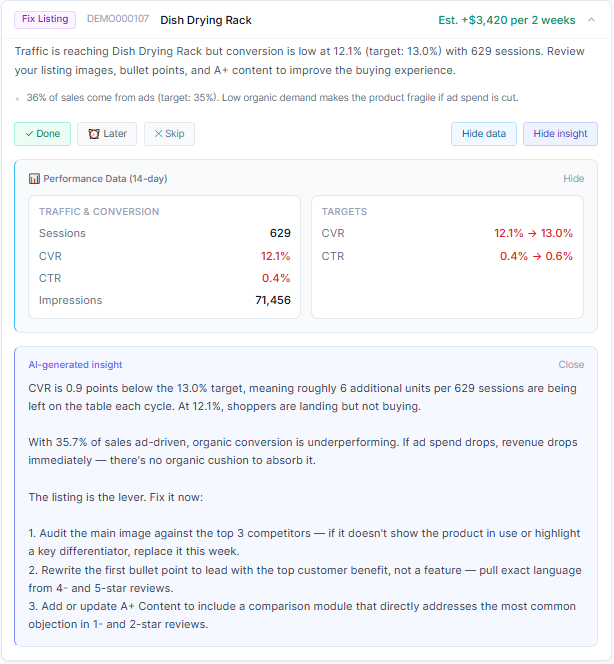
- Today's actions. The recommendations themselves, ordered by estimated impact, each with an evidence panel holding the readings it was computed from.
- Recent outcomes. What happened after the seller acted, measured against what was predicted.
How recommendations are generated
Recommendations come from a rule engine, not from a model guessing. Each account is provisioned with twenty-one pre-configured rules. Every rule is a stated condition over the account's own metrics, evaluated for each ASIN against the seller's targets for TACOS, click-through rate, conversion rate and days of stock. Those targets can be overridden per product, and the rules themselves can be edited, disabled or added to.
The engine produces six kinds of action: stop ads, reduce ads, scale ads, order inventory, fix listing, and win the Buy Box. Real examples of the shipped rules, named as they appear in the product:
- Stop ads — severe loss + extreme TACOS. The ASIN is losing money per unit and advertising spend is far above its target share of sales.
- Fix listing — low CVR despite good CTR. Shoppers are clicking at or above target and buying below it, which points at the detail page rather than at the campaign.
- Scale ads — efficient with room to grow. Spend is converting inside target and stock supports more volume.
- Order inventory — high demand stockout risk. Seven days of supply or less at the measured sales velocity, on a product that is selling.
- Listing suppressed by Amazon. The listing is not buyable at all, which no amount of repricing fixes.
- Nobody holds the Buy Box. No seller owns it, which usually means the price sits above Amazon's threshold.
Each finding is written up with the readings behind it, the estimated impact of acting over the next two weeks, and the contributing factors the rule weighed. A recommendation the seller marks as done, deferred or skipped stops being raised for a set period, so the brief does not repeat itself. Once acted on, the outcome is computed over the following seven days (fourteen for ads being scaled) and compared with the estimate.
Written reports, short explanations of a recommendation or of the monthly scorecard, and an assistant that answers questions about the account's own figures are generated with Anthropic's Claude models. The operations report and the sales dashboard insights replace product names with neutral placeholders before the request is sent and restore them in the response; the executive summary sends only totals and unnamed product lines. The assistant does not anonymise: to answer questions about specific products it sends product identifiers (ASINs and SKUs) and product titles with the figures. What each feature sends is set out on the security page.
Brand Analytics: what the role is used for
SellerCopilot requests Amazon's Brand Analytics role for one report: GET_SALES_AND_TRAFFIC_REPORT. Amazon lists Brand Analytics as the only role that grants it. SellerCopilot requests it one day at a time, broken down by child ASIN, and requests recent days again as Amazon settles them (see the cadence below). It is the source of the traffic and conversion figures the product is built around.
The fields SellerCopilot reads from it, and what uses each one:
- sessions and unitsOrdered. Conversion rate is computed from these two (units ordered divided by sessions) for every ASIN. It drives the listing rules, for example Fix listing — low CVR despite good CTR, and the conversion figures on the sales dashboard. Units ordered is also the sales velocity behind the inventory forecast.
- orderedProductSales. Revenue per ASIN and per day: the starting point of per-product profit, of TACOS, and of the profit- and TACOS-based advertising rules (stop, reduce and scale ads).
- totalOrderItems. Order counts and average order value on the sales dashboard.
- buyBoxPercentage. The seller's own Buy Box share over time, weighted by sessions. It drives Buy Box lost — check price and account health and Reduce ads — advertising without the Buy Box, and is how the outcome of a Buy Box recommendation is measured.
- pageViews. Available to the assistant when a seller asks about page views. No rule uses it.
The report also returns per-device session and page-view breakdowns and unitSessionPercentage. SellerCopilot stores those as Amazon returns them, and no feature uses them today. Its B2B and refund fields are not stored.
Every recommendation built on these figures is computed from the latest ingested day when the seller opens the brief, and its outcome is measured against the same report afterwards, which is why the daily, ASIN-level grain matters.
Amazon data sources, and what each one is used for
The table below is the complete set of Amazon data the application reads. Report names are Amazon's report type identifiers, and metric names are the field names Amazon returns.
Reports API, by child ASIN and day. Brand Analytics role.
Finances API, financial events
Reports API, FBA inventory ledger, daily by country
FBA Inventory API, every six hours
Product Pricing API (getItemOffersBatch), hourly
Reports API, listings, every six hours
Reports API, order history
Amazon Ads API v3, Sponsored Products
Amazon Ads API, at connection
listOfferMetrics
getSellingPartnerMetrics
Replenishment API 2022-11-07, Subscribe & Save, daily
Sellers API
The main ingestion runs once a day on a schedule the seller sets, in their own time zone, with a rolling window per source: ten days for sales and traffic, three for the inventory ledger, seven for orders and financial events, eight for advertising. Listing and inventory status refresh every six hours and Buy Box ownership every hour. A weekly pass re-reads a longer window. The brief and its recommendations are computed from the latest ingested day when the seller opens it. Amazon restates recent figures as they settle, and a rolling window is how the application picks up those corrections instead of keeping the first number it saw.
Profitability per product
Seller Central reports revenue well and profit poorly. It will tell a seller what an ASIN sold. It will not tell them what that ASIN earned after Amazon's fees, the cost of the goods and the advertising that attached to it.
Net profit per ASIN is computed by taking ordered product sales and deducting:
- FBA fulfilment and referral fees per unit sold, from Amazon's Fee Preview report, which the seller uploads for each marketplace. Each day's sales carry the fee that applied when the day was last ingested.
- Cost of goods, entered by the seller per product.
- Sponsored Products spend for the same ASIN over the same period.
Refunds, promotions, storage and other Amazon fees, and Sponsored Brands or Sponsored Display spend are not deducted from this figure. Amazon's financial events, which do carry them, appear on the financial dashboard instead. Without an uploaded Fee Preview report, no Amazon fees are deducted.
The recommendations apply the same deductions over the brief's fourteen-day window, using the FBA and referral fees entered for each listing in the product settings.
The result is a per-product profit figure, plus TACOS measured against the seller's own target rather than a generic benchmark, with ACOS and ROAS reported alongside it. It is presented daily, weekly and monthly, with period-over-period and year-over-year comparison. This is the deliberate difference from a dashboard that reports revenue: an ASIN with growing sales and a negative margin is a problem, and it only looks like one once the fees are in.
Fee Preview estimates are held per marketplace, and each upload is applied to the sales of the marketplace it was uploaded for. Where a marketplace has no estimate for a product, a fee from a Fee Preview report uploaded before estimates were held per marketplace can be used instead, and that report may have been for another marketplace.
How access and data handling work
- A seller connects SellerCopilot through Amazon's Selling Partner authorization flow, and through Amazon Ads authorization for advertising data.
- The application reads only the data of the account that authorized it.
- Authorization can be revoked by the seller at any time from Seller Central, and the advertising authorization from the Amazon account that granted it. After revocation, Amazon no longer returns data to SellerCopilot under that authorization. If the Seller Central authorization is revoked, SellerCopilot notices the next time it requests data from Amazon and Amazon refuses: no new collection starts for that Amazon account, and the SellerCopilot team deletes the data collected from it within 30 days of noticing, unless the seller reconnects it first. Removing the Seller Central connection in SellerCopilot's settings has the same effect. Revoking or removing only the advertising authorization stops advertising collection; it does not by itself delete stored data, which is deleted with the account or on request.
- No buyer names, email addresses, phone numbers or street addresses are stored. The repeat-purchase and customer-value analytics need to tell whether two orders came from the same customer. To do that, the first street line of the ship-to address is read in memory, combined with the city, state or province, postal code and country, and turned into a digest (a hash) that is stored in its place; the street line itself is never written down. What is stored with each order line is the digest and the ship-to city, state or province, postal code and country.
- All traffic is served over HTTPS/TLS. The Amazon credentials that authorize access are encrypted with AES-256-GCM before they are written, with the key held separately from the database. The database is a managed PostgreSQL service that encrypts data at rest, including backups.
- Data is retained while the account has a trial or a subscription. When a subscription ends, or a free trial ends without a payment method, the account's Amazon connections are switched off so no new collection starts (a run already under way may finish), and a 30-day retention period starts. The data is kept for at least the first 23 days of that period so the account can be resumed, and the SellerCopilot team deletes it before the 30 days are up. Deletion is carried out by a person, not automatically. A seller can ask for their account and its data to be deleted at any time.
The security overview sets this out in more detail, including what SellerCopilot does not claim, and the privacy policy covers the rights a seller has over their data.
Pricing
US$79 per month, with a 14-day free trial. One subscription covers the company account and every Amazon marketplace connected to it. See pricing for what is included.
Questions
For anything this page does not answer, including from a security or compliance reviewer, write to [email protected]. See also the security overview and the privacy policy.